
4.14. Sub-device configuration models
The V4L2 specification defines a subdev API that exposes three type of configuration elements: formats, selection rectangles and controls. The specification contains generic information about how those configuration elements behave, but not precisely how they apply to particular hardware features. We leave some leeway to drivers to decide how to map selection rectangles to device features, as long as they comply with the V4L2 specification. This is needed as hardware features differ between devices, so it’s the driver’s responsibility to handle this mapping.
Unfortunately, this lack of clearly defined mapping in the specification has led to different drivers mapping the same hardware features to different API elements, or implementing the API elements with slightly different behaviours. Furthermore, many drivers have implemented selection rectangles in ways that do not comply with the V4L2 specification. All of this makes userspace development difficult.
Sub-device configuration models specify in detail what the user space can expect from a sub-device in terms of V4L2 sub-device interface support, semantics included.
A sub-device may implement more than one configuration model at the same
time. The implemented configuration models can be obtained from the sub-device’s
V4L2_CID_CONFIG_MODEL control.
4.14.1. Common raw camera sensor model
The common raw camera sensor model defines a set of enumeration and configuration interfaces (formats, selections etc.) that cover the vast majority of functionality of raw camera sensors. Not all of the interfaces are necessarily offered by all drivers.
A sub-device complies with the common raw sensor model if the
V4L2_CONFIG_MODEL_COMMON_RAW_SENSOR bit is set in the
V4L2_CID_CONFIG_MODEL control of the sub-device. A client supporting the
common raw sensor model shall set the
V4L2_SUBDEV_CLIENT_CAP_COMMON_RAW_SENSOR sub-device client capability bit.
The common raw camera sensor model is aligned with Using camera sensor drivers. Please refer to that regarding aspects not specified here.
Each camera sensor implementing the common raw sensor model exposes a single V4L2 sub-device. The sub-device contains a single source pad (0) and two or more internal pads: one or more image data internal pads (starting from 1) and optionally an embedded data pad.
Additionally, further internal pads may be supported for other features. Using more than one image data internal pad or more than one non-image data pad requires these pads documented separately for the given device. The indices of the image data internal pads shall be lower than those of the non-image data pads.
This is shown in Common raw sensor sub-device with two pads.
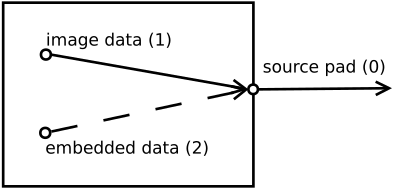
Common raw sensor sub-device with two pads
4.14.1.1. Routes
A sub-device conforming to common raw camera sensor model implements the following routes.
Sink pad/stream |
Source pad/stream |
Static (X/M(aybe)/-) |
Mandatory (X/-) |
Synopsis |
|---|---|---|---|---|
1/0 |
0/0 |
X |
X |
Image data |
2/0 |
0/1 |
M |
- |
Embedded data |
Support for the embedded data stream is optional. Drivers supporting the embedded data stream may allow disabling and enabling the route.
4.14.1.2. Starting and stopping streaming
Starting and stopping streaming is controlled through the stream number 0; if there’s a desire to capture additional streams, such streams need to be started before stream 0. All streams start and stop at the same moment.
This is subject to change in the future through additional API elements while the default behaviour will be maintained.
4.14.1.3. Sensor pixel array size, cropping and binning
The sensor’s pixel array is divided into one or more areas. The areas around the the visible pixel area in the pixel array, usually one or more sides, may contain optical black pixels, dummy pixels and other non-image pixels. The full size of the pixel array, including pixels that cannot be captured, is conveyed by the format on (pad, stream) pair 1/0.
Capturing the non-visible pixels outside the visible pixel area may be supported
by the sensor. This area corresponds to the V4L2_SEL_TGT_CROP_BOUNDS
selection target on (pad, stream) pair 1/0. Non-visible pixels may include
optical black pixels, dummy pixels or other non-visible pixels. The visible
pixel area corresponds to the V4L2_SEL_TGT_CROP_DEFAULT selection target on
(pad, stream) pair 1/0.
A rectangle within the pixel array contains the visible pixels. Capturing the
non-visible pixels outside the visible pixel area may be supported by the
sensor. The visible pixel area corresponds to the V4L2_SEL_TGT_CROP_DEFAULT
selection target on (pad, stream) pair 1/0.
Sensors can perform multiple operations that affect the output image size. The first
of these is the analogue crop. Analogue crop limits the area of the pixel array
which the sensor will read, affecting sensor timing as well. The granularity of
the analogue crop configuration varies greatly across sensors: some sensors
support only a few different analogue crop configurations whereas others may
support anything divisible by a given number of pixels. The analogue crop
configuration corresponds to the V4L2_SEL_TGT_CROP selection target on (pad,
stream) pair 1/0. The default analogue crop rectangle corresponds to the visible
pixel area.
In the next step, binning is performed on the image data read from camera sensor’s pixel array, as determined by the analogue crop configuration. Enabling binning will effectively result in an image smaller than the original by given binning factors horizontally and vertically. Typical values are 1/2 and 1/3 but others may well be supported by the hardware as well.
Sub-sampling follows binning. Sub-sampling, like binning, reduces the size of the image by including only a subset of samples read from the sensor’s pixel matrix, typically every n’th pixel horizontally and vertically, taking the sensor’s color pattern into account. Sub-sampling is generally configurable separately horizontally and vertically.
The combined effect of binning and sub-sampling is configured using the
V4L2_SEL_TGT_COMPOSE rectangle, relative to the analogue crop rectangle, on
(pad, stream) pair 1/0. It depends on the driver which of these operations are
being used to achieve the resulting size. Binning and sub-sampling are also
directly configured using V4L2_CID_BINNING_FACTORS and
V4L2_CID_SUBSAMPLING_HORIZONTAL and V4L2_CID_SUBSAMPLING_VERTICAL controls on drivers that support them.
The digital crop operation takes place after binning and sub-sampling. It is
configured by setting the V4L2_SEL_TGT_CROP rectangle on (pad, stream) pair
0/0.
The scaling operation is performed after the digital crop. It is configured by
setting the V4L2_SEL_TGT_COMPOSE rectangle on (pad, stream) pair 0/0,
relative to the digital crop. The resulting image size is further output by the
sensor on the sensor’s data interface.
The sensor’s output mbus code is configured by setting the format on the (pad, stream) pair 0/0. The width and height fields are used to configure post-scaler digital crop if supported by the driver, affecting the right and bottom edges of the frame. If post-scaler digital crop is not supported, the width and height fields of the format will match the compose rectangle sizes applied on the same 0/0 (pad, stream) pair.
Drivers may only support some or even none of these configurations, in which
case they do not expose the corresponding selection rectangles. If any selection
targets are omitted, the further selection rectangle or format is instead
related to the previous implemented selection rectangle. For instance, if the
sensor supports binning but not analogue crop, then the binning configuration
(V4L2_SEL_TGT_COMPOSE selection target) is done in relation to the visible
pixel area (V4L2_SEL_TGT_CROP_DEFAULT selection target).
Also refer to Selection targets.
Pad/Stream |
Selection target/format |
Mandatory (X/-) |
Modifiable (X/-) |
Synopsis |
|---|---|---|---|---|
1/0 |
Format |
X |
- |
The width and the height fields indicates the full size of the physical pixel array, including non-visible pixels and pixels that cannot be captured. The media bus code of this format reflects the native pixel depth of the sensor. |
1/0 |
|
X |
- |
The width and the height fields indicates the full size of the pixel array that can be captured, including non-visible pixels. Should the shape of the pixel array not be a rectangle, this rectangle is the smallest possible rectangle that covers all capturable pixels of the pixel array. This rectangle is relative to the format on the same (pad, stream). |
1/0 |
|
X |
- |
The visible pixel area. This rectangle is relative to the format on the same (pad, stream). |
1/0 |
|
- |
X |
Analogue crop. Analogue crop typically has a coarse granularity. This rectangle is relative to the format on the same (pad, stream). |
1/0 |
|
- |
X |
Binning and sub-sampling. This rectangle is relative to the
|
2/0 |
Format |
X |
- |
Embedded data format. |
0/0 |
|
- |
X |
Digital crop. This rectangle is relative to the |
0/0 |
|
- |
X |
Scaling. This rectangle is relative to the |
0/0 |
Format |
X |
X |
Image data source format and post-scaler crop. The width and height
fields of the format, used to configure post-scaler crop on the right
and bottom edges of the image, are related to the |
0/1 |
Format |
X |
- |
Embedded data source format. |
4.14.1.4. Frame rate
Drivers supporting the Common raw camera sensor model support V4L2_CID_LINE_LENGTH_PIXELS and V4L2_CID_FRAME_LENGTH_LINES controls for frame rate configuration.
4.14.1.5. Embedded data
The embedded data stream is produced by the sensor when the corresponding route is enabled. The embedded data route may also be immutable or not exist at all, in case the sensor (or the driver) does not support it.
Generally the sensor embedded data width is determined by the width of the image data whereas the number of lines are constant for the embedded data. The user space may obtain the size of the embedded data once the image data size on the source pad has been configured.
Also see Embedded data.
4.14.2. MIPI Camera Command Set (CCS) model
The MIPI Camera Command Set configuration model is implemented by the CCS driver.